Thread data spreadsheet
The Thread.xls Microsoft Excel spreadsheet file, which is located in the Design Data folder, provides data for hole and thread commands. The Application Options and/or project settings can affect the spreadsheet file's location.
The spreadsheet contains various worksheets in one of two formats: Parallel Thread Type or Taper Thread Type.
Format of the parallel thread type worksheet
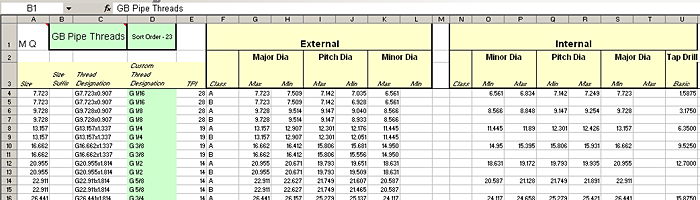
The top three rows contain column headers and other general data. The significant cells in this area are:
A1 | This cell identifies how hole and thread features use this worksheet.
|
B1/C1 | These merged cells contain the custom thread type name that appears in the hole and thread dialog boxes. Unlike the name on the worksheet tab, you can customize this thread type name to satisfy language or company differences without affecting the ability to exchange design data. |
D1 | This cell contains the sort order number, which is used to determine the thread type list order in the dialog boxes. The number does not have to be sequential. A lower number places the thread type above the types with higher sort order numbers. |
The area containing thread data begins on the fourth row. Columns for thread data are divided into three sections:
- Columns A-E contain data common to both the internal and external thread
- Columns F-L contain data specific to the external thread
- Columns N-U contain data specific to the internal thread
The following lists each column and its contents:
A | Specifies the nominal diameter size of the thread as a decimal value. |
B | Specifies the nominal diameter size of the thread as an optional string value that is appended to the value in column A and shown in the Hole dialog box. |
C | Specifies the thread designation that is a key to identify a particular thread. |
D | Specifies the custom thread designation that appears in dialog boxes and can be optionally displayed in hole and thread notes. You can customize this value without affecting the hole or thread feature. However, if multiple rows contain the same thread designation, they all must have the same custom thread designation. |
E | Specifies the axial distance of the thread. If cell A1 contains the letter P, this column shows pitch distance values; if cell A1 contains the letter Q, this column shows thread per inch (TPI) values. |
F | Specifies the tolerance class, which represents dimensional variability, for the external thread. Class is also a key. |
G and H | Specify the maximum and minimum values, respectively, of the major diameter of the external thread, which is the diameter of a virtual cylinder that touches the crest of the external thread. |
I and J | Specify the maximum and minimum values, respectively, of the pitch diameter of the external thread, which is the diameter of a virtual cylinder where the width of the thread and width of the gap are equal. |
K and L | Specify the maximum and minimum values, respectively, of the minor diameter of the external thread, which is the diameter of a virtual cylinder that touches the root of the external thread. |
N | Specifies the tolerance class, which is a key, for the internal thread. |
O and P | Specify the maximum and minimum values, respectively, of the major diameter of the internal thread, which is the diameter of a virtual cylinder that touches the root of the internal thread. |
Q and R | Specify the maximum and minimum values, respectively, of the pitch diameter of the internal thread, which is the diameter of a virtual cylinder where the width of the thread and the width of the gap are equal. |
S and T | Specify the maximum and minimum values, respectively, of the minor diameter of the internal thread, which is the diameter of a virtual cylinder that touches the crest of the internal thread. |
U | Specifies the tap drill diameter for the internal thread, which is the suggested drill diameter for the hole. |
Format of the taper thread type worksheet
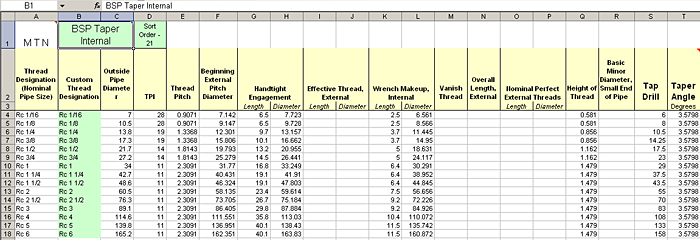
The top three rows contain column headers and other general data. The significant cells in this area are
A1 | This cell identifies how the hole and thread features use this worksheet.
|
B1/C1 | These merged cells contain the custom thread type name that appears in the dialogs. Unlike the name on the worksheet tab, you can customize this thread type name to satisfy language or company differences without affecting the ability to exchange design data. |
D1 | This cell contains the sort order number, which is used to determine the thread type list order in the dialogs. The number does not have to be sequential. A lower number places the thread type above those with higher sort order numbers. |
The area containing thread data begins on the fourth row. The following lists each column and its contents:
A | Specifies the thread designation, also known as the nominal size of the thread. It is a key for identifying thread selection. |
B | Specifies the custom thread designation, which can be useful in obtaining correct thread callouts in drawings. |
C | Specifies the outside pipe diameter. |
D | Specifies the threads per inch (TPI) value. |
E | Specifies the pitch distance, which is the distance from a point on one thread to a corresponding point on the next thread, measured along the thread axis. |
F | Specifies the beginning value of the external pitch diameter. |
G | Specifies the handtight engagement length, which is the normal length of engagement between external and internal taper threads when screwed together by hand. |
H | Specifies the pitch diameter at a handtight engagement position. |
I | Specifies the effective external thread length. |
J | Specifies the effective (pitch) diameter of the external thread at the large end. |
K | Specifies the wrench makeup length of the internal taper thread. |
L | Specifies the pitch diameter of the small end of the wrench makeup length of the internal taper thread. |
M | Specifies the vanishing length of the external taper thread. |
N | Specifies the overall length of the external taper thread. |
O | Specifies the length of the nominal perfect external taper thread. |
P | Specifies the pitch diameter of the nominal perfect external taper thread. |
Q | Specifies the thread height. |
R | Specifies the basic minor diameter at the small end of the pipe. |
S | Specifies the tap drill diameter for the internal taper thread. |
T | Specifies the taper angle, in degrees, as an included angle. |
Edit the thread data spreadsheet
Autodesk Inventor uses a Microsoft Excel spreadsheet file, Thread.xls, to provide data for hole and thread commands. The spreadsheet is located in the Design Data folder. The Application Options and/or project settings can affect the file's location.
The spreadsheet contains various worksheets in one of two formats: Parallel Thread Type or Taper Thread Type. The worksheets contain some common industry standard thread types and standard tapped hole sizes. You can edit the worksheets to:
- Change the sort order.
- Revise custom thread designations.
- Revise custom thread type names.
We recommend that you do not delete thread types or rows. If an iPart or Content Center tries to instantiate a part that requires the deleted data, the operation can fail. To add a thread type, see Add a new thread type or clearance hole type.
Change the sort order
You can change the order in which the thread types appear in the Hole and Thread feature dialog boxes so that the thread type you use most frequently appears first.
- With Autodesk Inventor closed, open the Thread.xls file.
- Click the tab of the thread type you want to edit.
- In cell D1, change the sort order number to a value from 1 to n to match the appropriate priority. The number does not have to be sequential.
- Save the spreadsheet.
- Start Autodesk Inventor and view your changes.
Revise custom thread designations
You can customize thread designations by entering a string for each thread size in the Custom Thread Designation column of the Microsoft Excel spreadsheet. The string is then available in thread and hole features and can be recovered in hole notes in a drawing.
- With Autodesk Inventor closed, open the Thread.xls file.
- Click the tab of the worksheet you want to edit.
- Locate the Custom Thread Designation
column (column D in a Cylindrical worksheet or column B in a Taper
worksheet) and edit the cell as appropriate.
Note: To avoid spreadsheet errors, edit only the Custom Thread Designation column, not the Thread Designation column. If the same thread designation appears on several rows, the custom thread designation must be the same for each.
- Save the spreadsheet.
- Start Autodesk Inventor and view your changes.
Revise custom thread type names
You can change the thread type names so that they appear in the Hole and Thread feature dialog boxes as appropriate for the local language or to suit the conventions of you company.
- With Autodesk Inventor closed, open the Thread.xls file.
- Click the tab of the worksheet you want to edit.
- In cell B1, change the text that specifies the custom thread type name so that the name is appropriate.
- Save the spreadsheet.
- Start Autodesk Inventor and view your changes.
Add a new thread type or clearance hole type
| The Thread.xls Microsoft Excel file, located in the Design Data folder, provides data for hole and thread commands. The Application Options and/or project settings can affect the spreadsheet file's location. Each worksheet in the spreadsheet corresponds to a different thread type. Thread types are designated as either Parallel Thread Types or Taper Thread Types. The Clearance.xls Microsoft Excel file, located in the same folder as the Thread.xls file, manages clearance data. The Clearance.xls file has only one format. Microsoft Excel is not required to create threaded or clearance holes within Autodesk Inventor. However, Excel is required to add a new thread or clearance type. |

To add a thread type:
- Close Autodesk Inventor, and open the Thread.xls file.
- Copy an existing worksheet of the same type (parallel or taper).
- Delete most or all of the data rows (row 4 and below), and add data rows as required.
- Rename the worksheet name (thread type name) and custom thread type name (cell B1/C1).
- Edit cells A1 and D1.
- Save the file.
Note: Changes to the Excel file are refreshed on startup.
To add a clearance type:
We recommend that you use similar rules to add a new clearance type in the Clearance.xls file.