Drawing Browser
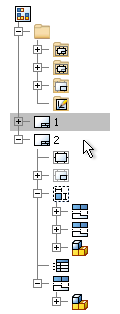 | The drawing browser displays drawing resources, drawing sheets, drawing views, referenced models, and objects placed on drawing sheets. Sheets are arranged in the order they were created. You can expand a sheet to display the views it contains. You can also show the contents of a view to display a list of the parts that comprise the view. To change the order of a sheet, drag it to a new position in the hierarchy. Only one sheet is active at a time. All other sheets are shaded in the browser. To activate a sheet, double-click its name. Use context menu options to manage objects listed in the browser. |
Shows the Drawing Resources, sheets, and views in a drawing or template.

Tip
- To copy a sheet format, border, title block, or sketched symbol from one drawing to another, right-click the resource and choose Copy. Open the destination drawing, right-click the Sheet Formats, Borders, Title Blocks, or Sketched Symbols entry in the browser, and choose Paste.
- To rename a sheet format, border, title block, or sketched symbol, select the name in the browser, and slow-click it. Then insert a new name.
- To sort sheet formats, borders, title blocks, or sketched symbols by name in the browser, right-click the Sheet Formats, Borders, Title Blocks, or Sketched Symbols entry and select Sort by Name.
- To reorder drawing resources, drag a sheet format, border, title block, or sketched symbol and drop it at the appropriate position in the browser.